
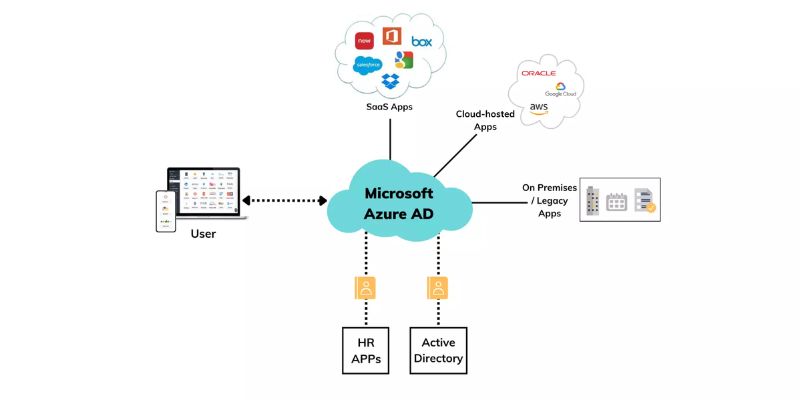
In today’s digital world, keeping our online identities safe is more important than ever. As more businesses move their operations to the cloud, they need strong tools to manage who can access what within their networks. Microsoft Azure Active Directory (Azure AD) is one of those tools. It helps organizations secure their systems by managing user identities and controlling access to important resources. If you want to learn more about using Azure AD effectively, consider enrolling in Azure Training in Bangalore to deepen your understanding. In this blog, we’ll explore how Azure AD works, its key features, and why it’s a game-changer for identity and access management.
What is Azure Active Directory?
Azure Active Directory is a cloud-based service from Microsoft that helps manage user identities and control access to apps, data, and other resources. It’s like a gatekeeper that ensures only the right people can enter and use the right tools within an organization’s network. Azure AD is integrated with many other Microsoft services, such as Office 365, and can also connect to many third-party applications, making it a versatile tool for businesses of all sizes.
Key Features of Azure Active Directory
Azure AD comes packed with features that help enhance security and streamline access management:
- Single Sign-On (SSO)
It is a feature which allows users to log in and access to multiple applications without needing to log in again. This makes life easier for users by reducing the number of passwords they have to remember. It also helps prevent security issues caused by weak or reused passwords. With Azure AD’s SSO, employees can quickly access all their work apps, both on-premises and in the cloud, without having to log in repeatedly.
- MFA
Adds an extra layer of protection verifying users identity in more than one way, such as through a password and a phone app or a fingerprint. This means that even if someone’s password is stolen, the hacker would still need another form of verification to gain access. Azure AD’s MFA is flexible, allowing businesses to set different levels of security based on the user’s role, location, or the device they’re using.
- Conditional Access
Conditional Access is a feature that lets organizations decide when and how users can access resources based on specific conditions. This way, access is more secure without inconveniencing users unnecessarily. It’s like setting up security rules that adjust based on the situation, ensuring that only the right people access sensitive data.
- Identity Protection
Identity Protection in Azure AD uses smart technology to spot unusual activity, like a user logging in from a new country or trying to access resources at odd hours. When it detects something suspicious, it can automatically take action, like asking for additional verification or blocking the user until the issue is resolved. This proactive approach helps catch potential security threats before they become bigger problems.
- Privileged Identity Management (PIM)
Privileged Identity Management is all about controlling who has access to the most important and sensitive parts of your network. With PIM, users only get elevated permissions when they need them, and their access is closely monitored. This reduces the risk of insider threats ensuring only authorized personnel can perform high-level tasks.
- Self-Service Password Reset (SSPR)
Self-Service Password Reset lets users reset their passwords on their own without having to call the IT department. This is not only convenient for users but also reduces the workload for IT staff. By enabling SSPR, businesses can ensure that employees can get back to work quickly if they forget their passwords, all while keeping the process secure.
Why Use Azure Active Directory?
Azure AD offers numerous benefits that make it a smart choice for managing identities and access within an organization:
Better Security
With features like MFA, conditional access, and Identity Protection, Azure AD helps ensure that only the right people can access sensitive data. These tools work together to block unauthorized access and protect your business from cyber threats.
Simplified User Experience
By using Single Sign-On, Azure AD makes it easier for employees to access all the tools they need without constantly logging in. This not only boosts productivity but also reduces the frustration of dealing with multiple passwords.
Centralized Management
Azure AD provides a single place where IT administrators can manage user identities across the entire organization. Whether the apps are on-premises or in the cloud, everything can be controlled from one platform, making it easier to enforce security policies.
Scalable and Flexible
Since Azure AD is cloud-based, it can easily grow with your business. Whether you’re adding new users, integrating new apps, or scaling up your operations, Azure AD can handle it. Plus, it works well with many third-party applications. Giving you the flexibility to use the tools that best meet your needs.
Compliance and Auditing
Azure AD helps businesses stay compliant with industry regulations by keeping detailed logs of who accesses what and when. This makes it easier to track activities, manage risks, and provide the necessary documentation during audits.
Best Practices for Using Azure Active Directory
To get the most out of Azure AD, it’s important to follow these best practices:
Enable Multi-Factor Authentication (MFA) for All Users
MFA is a must-have for protecting your users’ accounts. It adds a extra layer of security making it hard for attackers to gain unauthorized access.
Use Conditional Access Policies
Set up conditional access policies to control who can access what, based on factors like the user’s location, device, or role. This allows you to tailor security settings to match different levels of risk.
Regularly Review and Audit Access
Make it a habit to review who has access to your critical resources and adjust permissions as needed. Regular audits help ensure that your security settings are up to date and that no one has access to something they shouldn’t.
Educate Your Users
Make sure your employees know how to recognize phishing attempts and understand the importance of security measures like MFA. The more knowledgeable your users are, the better they can protect themselves and your organization.
Leverage Self-Service Features
Encourage users to take advantage of Self-Service Password Reset. This reduces the strain on your IT team and helps users resolve issues quickly and securely.
Azure Active Directory is a prominent tool that significantly enhances identity and access management for businesses. With features like Single Sign-On and many more, it provides robust security while also making life easier for users. Implementing Azure AD can help protect your business from cyber threats, simplify access management, and ensure compliance with industry regulations. If you’re looking to deepen your knowledge and skills in using Azure AD effectively, consider enrolling in an Coaching Centre in Bangalore to get hands-on experience and expert guidance. In an era where digital security is more critical than ever, Azure AD offers a comprehensive solution for managing identities and access in the cloud.a